Are Your Marketing Tools Actually Working Together?
What this means for your business
A CRM, call tracking, a review tool and a scheduler that do not share data create gaps. Pick the few that connect, and make sure a call becomes a tracked job.
Scheduling, reminders, reviews and reporting should hand data to one another. Fewer connected tools beat many disconnected ones.
Intake forms, phone systems and case management should pass information along. Each extra tool that does not connect is another place a prospect can fall out.
 AD BOOST INTELLIGENCE
The MarTech Connection Audit
More applications do not guarantee better operations.
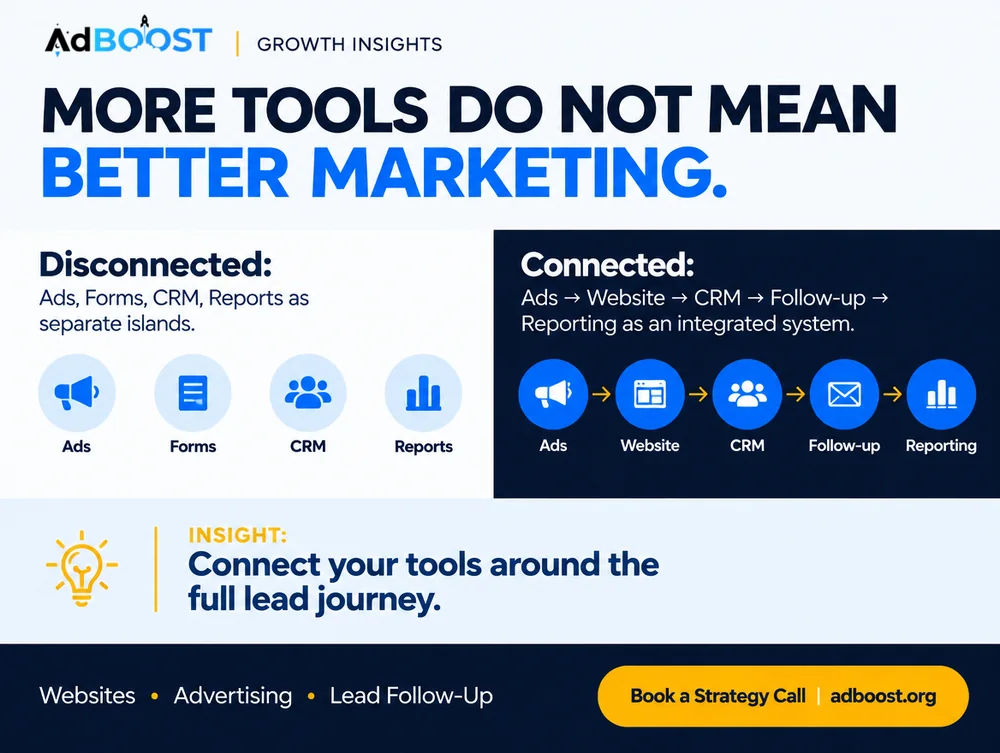
Disconnected Tool Collection
Connected Marketing System
A dependable workflow matters more than the number of tools.
An original Ad Boost systems diagnostic that compares isolated marketing applications with a connected customer acquisition workflow. It evaluates data movement, ownership, follow-up, outcome tracking, and operational necessity to identify whether tools should be integrated, simplified, replaced, or removed.
The problem is rarely a shortage of marketing software
A commercial plumbing company pays for an advertising platform, a landing-page builder, a call tracking service, a CRM, an email automation system, an appointment calendar, a reporting dashboard, and several integration subscriptions. Every vendor describes its product as essential. Yet a property manager submits a service request, receives two automated confirmations, and never gets a call from the appropriate commercial service coordinator.
Nothing failed in the way the owner expected. The form submitted successfully. The CRM created a contact. An email was sent. The integration dashboard showed successful activity. The actual customer request was still mishandled because ownership and routing rules did not reflect how the business operates.
Marketing technology, often called MarTech, includes the software and systems used to attract customers, capture inquiries, manage communications, measure performance, and support marketing operations. A marketing technology stack is the collection of those tools. A marketing operating system is the connected process that determines how information moves between them and how people act on it.
Those are different concepts. A company can have an expensive technology stack and a weak operating process. Another can use a modest collection of tools and handle customers consistently because its data definitions, responsibilities, and workflows are clear.
Integration is also not the same as automation. An integration transfers information between systems. An automation performs an action under defined conditions. Connecting a form to a CRM may create a lead record. Assigning that record to the correct employee and ensuring a response occurs requires additional rules and accountability.
A system can appear connected while still producing unreliable data. One platform may label a website form submission as a conversion. Another may count a qualified lead only after an employee reviews it. The CRM may create multiple records for the same contact. A dashboard that adds those values together without understanding their definitions can produce a persuasive but misleading report.
Privacy and security also matter. Every additional integration can introduce access permissions, stored customer information, external vendors, and failure points. For a medical practice or law firm, sensitive inquiries require particular care. More automation is not automatically better when it increases exposure or makes accountability harder to establish.
Ad Boost's operating principle is to design the customer and data workflow first, then determine which tools are necessary. Software should support a clearly understood process. It should not determine the process simply because a feature happens to be available.
How to recognize a marketing stack that has outgrown its process
Do not audit software by reading feature lists. Follow a single customer inquiry through every relevant system. Identify where the information originates, where it is stored, which applications modify it, and who takes responsibility for the next action. Then inspect how the resulting appointment or sale is reported. A workflow that cannot be explained from beginning to end deserves attention before another subscription is added.
- Can you name the authoritative system of record for customer inquiries, appointments, and sales outcomes?
- Do forms, calls, chats, and advertising lead forms reliably reach the appropriate destination with usable contact information?
- Are lead statuses, campaign sources, and conversion events defined consistently across systems?
- Does every important automation have a documented trigger, action, owner, failure alert, and way to disable it?
- Are employees manually copying information between applications because existing integrations are unreliable?
- Can you trace a qualified appointment back through the lead record to the available marketing source evidence?
- Do you know which vendors store customer information, who can access it, and which subscriptions duplicate existing capabilities?
Should you integrate, simplify, replace, or remove a marketing tool?
| Situation | Recommended action | Why | Exception |
|---|---|---|---|
| Two tools provide the same function and both are actively used. | Identify the authoritative workflow, compare unique requirements, and consolidate when practical. | Duplicate systems can create inconsistent records, training costs, and unnecessary subscriptions. | Some teams legitimately need specialized tools for different regulatory or operational requirements. |
| Lead information reaches the CRM but the wrong employee receives it. | Correct routing logic, ownership rules, and service classifications. | The failure is operational rather than necessarily a missing software feature. | The CRM may lack required routing capabilities, making a different solution justified. |
| A dashboard combines incompatible lead totals. | Document metric definitions and rebuild reporting around comparable events. | Adding numbers from different measurement systems can create misleading performance claims. | Separate platform-specific dashboards remain useful when their definitions are clearly labeled. |
| Employees manually transfer the same information every day. | Standardize fields and evaluate an appropriate integration or controlled automation. | Repetitive transfer creates delay and avoidable transcription errors. | Sensitive data, incompatible systems, or low transaction volume may make manual review preferable. |
| An automation occasionally fails without anyone noticing. | Add error monitoring, exception routing, and an accountable owner before increasing reliance on it. | Invisible failures can damage customer experience while software appears operational. | A temporary manual fallback may be safer while the root cause is repaired. |
| A vendor offers a powerful new AI marketing tool. | Require a specific use case, expected operational benefit, security review, and measurable pilot. | A feature is valuable only when it improves an identifiable business process. | A necessary replacement may still be justified when the existing system is unsupported or insecure. |
Worked example
Imagine a fictional commercial plumbing and mechanical contractor called Meridian Mechanical. It serves facilities managers, property management companies, and commercial construction clients. The company uses eight separate marketing and sales applications, but its staff cannot reliably explain how inquiries move from the website into estimating.
For a hypothetical four-week audit, the company identifies 25 valid new-business inquiries across calls, forms, and direct emails. Twenty-one appear in the CRM. Four remain only in source inboxes or call records. Of the 21 recorded inquiries, six lack a documented owner, and several have duplicate entries created by separate integrations.
The owner initially considers purchasing another automation platform. Instead, the operations manager maps the existing workflow and discovers that commercial service requests and residential inquiries share a default routing rule. The CRM receives both types, but notifications go to an employee responsible only for residential service. The problem is not a lack of software. It is an inaccurate assignment rule.
The team revises the form classifications, assigns commercial inquiries to the proper queue, creates an exception alert for records without owners, and removes a redundant integration that creates duplicate contacts. In a separate hypothetical test, the team sends clearly marked sample inquiries through each channel to verify the corrected workflow.
Suppose the original process required a combined seven staff hours per week for copying records, reconciling duplicate contacts, and checking notifications. After the changes, the same categories of work require three hours. That represents four hours of observed hypothetical labor reduction before considering maintenance or transition costs.
The owner also reviews software spending. Removing a redundant application may reduce expense, but the team evaluates cancellation terms, data retention, historical records, and dependencies before terminating the subscription. An apparent cost saving is not worthwhile if essential customer records become inaccessible.
The strongest result is not the number of applications removed. It is that each valid commercial inquiry has a predictable destination, an accountable employee, and a traceable outcome. That operational capability can support better marketing decisions regardless of the final software count.
Inquiry capture coverage = valid inquiries recorded in the system of record / all identifiable valid inquiries x 100. Net workflow time saved = baseline labor time - revised labor time - additional maintenance or exception-handling time. Total stack cost = software subscriptions + relevant integration costs + administration and maintenance costs.
The contractor, number of applications, inquiry records, hours, and workflow outcomes are entirely hypothetical teaching inputs, not actual Ad Boost client results or industry benchmarks.
How to audit and simplify your marketing technology stack
Create a complete application inventory
List every tool involved in advertising, websites, forms, calling, messaging, email, CRM, scheduling, analytics, reporting, and data transfer. Record its owner, purpose, approximate cost, renewal terms, important integrations, and the type of information it stores. Include tools managed by outside agencies or individual employees when they participate in official workflows.
Define the authoritative records
Specify which system holds the official lead record, appointment status, customer outcome, and verified contact information. Document the approved definitions for valid inquiries, qualified leads, bookings, and customers. Establish how duplicates are recognized and how corrections propagate. Different systems may retain their own event records without all becoming competing sources of truth.
Map the end-to-end customer workflow
Trace inquiry entry points through collection, data transfer, lead assignment, follow-up, scheduling, and final outcome. Mark every point where a record changes systems or requires human action. Document the actual workflow, including workarounds, rather than relying on how vendors describe the intended integration.
Test integrations and failure handling
Send clearly labeled test inquiries through relevant forms, call routes, and messaging systems. Verify timestamps, contact details, lead source fields, assignment rules, and notifications. Simulate suitable error conditions where safe to determine whether failures generate alerts and whether staff know how to recover. Protect real customer information during testing.
Review duplication, cost, and security
Compare tools that perform overlapping functions. Identify abandoned subscriptions, unsupported integrations, excessive access permissions, and unnecessary exposure of sensitive information. Evaluate whether consolidating functions would simplify operations without removing essential capabilities. Review relevant contracts and privacy obligations before transferring or deleting data.
Repair the highest-consequence handoffs
Prioritize issues that prevent valid inquiries from being captured, assigned, answered, or advanced. Correct routing and data definitions before purchasing advanced reporting features. Add monitoring for failed integrations, unassigned leads, and overdue tasks. Document who is responsible for responding to each class of exception.
Maintain a simpler systems operating standard
Require a business case for new software, including the existing problem, the expected operational improvement, data implications, costs, and accountable owner. Maintain a current integration diagram and periodically review permissions, subscriptions, broken automations, and customer outcomes. Retire tools only after confirming that necessary records and workflows remain intact.
How to measure whether your marketing systems are actually improving
Tool count is not a performance metric by itself. Measure whether inquiries reach the right destination, employees can act on them, outcomes are recorded accurately, and the system costs are justified. Compare the same processes before and after meaningful changes, including maintenance work that may otherwise remain invisible.
- Inquiry capture coverage
- Valid inquiries recorded in the authoritative system divided by all identifiable valid inquiries, multiplied by 100. Reconcile relevant form logs, calls, messages, and CRM records.
- Lead assignment completeness
- Captured valid inquiries with the correct accountable owner divided by captured valid inquiries requiring assignment, multiplied by 100. Verify against documented service and routing rules.
- Integration exception volume
- Count confirmed failed transfers, mapping errors, duplicate creation incidents, and unhandled automation exceptions during a defined period. Classify by consequence rather than treating every technical warning equally.
- Manual reconciliation effort
- Track staff time spent copying records, resolving duplicates, correcting fields, and investigating unexplained reporting differences. Compare equivalent work periods and include additional maintenance effort.
- Marketing technology operating cost
- Combine subscription charges, integration expenses, relevant administration labor, vendor support, and maintenance costs. Report material one-time transition expenses separately from recurring operating costs.
- Outcome traceability
- Review the proportion of eligible booked opportunities or customers with a traceable underlying lead record and documented available source information. Do not invent missing source details to increase completeness.
Common mistakes and when this advice is wrong
- Buying another tool before defining the process. New features cannot compensate for unclear lead ownership, inconsistent statuses, or undefined business objectives. Establish the operating requirements before evaluating software.
- Assuming connected applications exchange correct information. A successful integration can still transfer inaccurate fields, create duplicates, or route leads incorrectly. Test the full workflow and customer outcome, not only the technical connection.
- Consolidating systems solely to reduce subscription costs. A cheaper stack may lose important functionality, historical records, reliability, or appropriate access controls. Evaluate transition costs and operational risk before removing a tool.
- Confusing dashboards with authoritative records. A visually polished dashboard may combine incompatible conversions or attribution models. Define each metric and reconcile representative records before making spending decisions.
- Automating sensitive customer information without safeguards. Medical, legal, financial, and other sensitive workflows may require approved vendors, restricted permissions, secure handling, and professional or legal review. Convenience does not override confidentiality and privacy obligations.
Frequently asked questions
How many marketing tools should a small business use?
There is no ideal universal number. A business should use the tools necessary to support reliable customer acquisition, communication, measurement, and operations without unnecessary duplication. A simple company may function well with a small integrated system, while a multi-location organization may require specialized applications. Judge the stack by process reliability, data accuracy, security, operational effort, and cost rather than application count.
What is the difference between a CRM and marketing automation?
A CRM is commonly used to organize customer and prospect information, activities, statuses, and relationships. Marketing automation performs defined actions such as routing inquiries, sending permitted follow-ups, or updating records under specified conditions. Many modern products combine these capabilities. The important distinction is operational: where information is recorded, what action occurs, who owns it, and how errors are handled.
Should my advertising platforms connect directly to my CRM?
Connecting relevant lead and outcome information can improve workflow and measurement, but the correct architecture depends on the available integrations, data quality, privacy requirements, and business process. Confirm that records transfer accurately, duplicate handling is defined, and sensitive information is protected. A direct connection is not automatically better than a controlled integration layer or appropriately managed manual process.
How can I tell whether a marketing automation is broken?
Test representative inputs and verify the expected result at every stage. A form submission should create the correct record, trigger the intended assignment, and produce appropriate notifications. Review error logs, unassigned records, duplicate contacts, and missing follow-up activity. Establish alerts and a manual fallback. A successful trigger message is not sufficient proof that the customer was handled correctly.
When should I replace my existing CRM?
Consider replacement when the system cannot reliably support necessary workflows, data integrity, appropriate security, reporting, or reasonable maintenance after practical configuration improvements. Document the requirements and failure evidence first. Evaluate migration risks, historical data, employee training, integrations, and operating costs. Replacing software because a competing product offers fashionable AI features is rarely a sufficient business case by itself.
Audit Your Marketing Systems
Find the disconnected tools, unreliable handoffs, and reporting gaps that may be costing your business opportunities.
Audit Your Marketing Systems